Maproom

Interactive & editable digital maps

  • about
  • news
  • contact
  • 0 items
Log in
  • Britain & Ireland maps
    • Britain and Ireland
    • Ireland
    • UK - United Kingdom
    • England
    • Scotland
    • Wales
    • Northern Ireland
    • Isle of Man
    • Channel Islands
  • City maps
    • Birmingham
    • Brighton
    • Bristol
    • Cardiff
    • Edinburgh
    • Exeter
    • Glasgow
    • Liverpool
    • London
    • Manchester
    • Oxford
  • Postcode maps
    • Overview
    • Dynamic postcode mapping tools
    • Downloadable postcode maps
  • Thematic maps
    • UK administrative regions
    • County maps
    • Local authority maps
    • London borough maps
    • River maps
    • National park maps
    • Transport maps
  • World maps
    • World maps
    • Europe maps
    • Map of EU countries 2026
    • Maps of France
    • Maps of Germany
    • Maps of New York and environs
  • DYNAMIC MAPPING
    • Showcase
    • Dynamic Mapping Suite intro
    • PRICING / GET A PASS
  • BESPOKE

Death Valley National Park map shows our desert hillshading technique using Copernicus elevation data

View full size map

Copernicus is the Earth observation component of the European Union’s Space programme. We used Copernicus’s DEM (Digital Elevation Model) data at 30-metre intervals, processing and colourising the data points with our specialist GIS (Geospatial Information Systems) software to create the desert hillshading backdrop for this map of Death Valley National Park. After creating the base we then overlaid other layers: the lakes and rivers, roads, the state boundary between California and Nevada, and the boundary of Death Valley National Park shown in green.

Copernicus’s data covers all countries – please contact us if you want a beautiful bespoke hillshading backdrop for your next mapping project, no matter which part of Britain, Ireland or indeed any part of the world you want to cover. Our technique is especially suited to subjects in which terrain visualisation is a key component, such as travel, military, hiking and history maps.
6 November 2026
Filed Under: Bespoke Mapping Samples, Maproom News, Travel Maps

We now have a Deep Zoom Viewer for displaying large artwork PDFs, JPEGs, PNGs or TIFFs on your website

Map artwork files with a myriad of small labels and tiny details are typically hard to display legibly on websites, but Maproom has developed a Deep Zoom Viewer system that can smoothly handle even the very largest map files within a compact viewer window.

If your artwork file is too big for a browser to load without slowing down or crashing your web page, enquire about our Deep Zoom Viewer.

The way it works is that we take your large map artwork file, and break it up into hundreds or even thousands of smaller artwork files that are loaded in a pyramid of seamless tiles according to how deep you zoom.

The viewer can be embedded as an iframe on your website, similar to how a YouTube video can be embedded.

Your deep-zoom maps are hosted in Maproom’s Dynamic Mapping Suite, and you can display them on your website for as long as you continue subscribing, on monthly PAYG or annual pass.

Examples of static maps using our Deep Zoom Viewer

Zone map

Original file: 5.7mb PDF / 5,000 x 7,000px
202 image tiles

View full size map

Region map

Original file: 50mb JPEG / 15,000 x 9,000px
787 image tiles

View full size map

Street map

Original file: 18mb PDF – 18,887 × 18,780px
1,879 image tiles

View full size map

Supersize street map

Original file: 31mb PDF – 36,884 × 32,796px
6,428 image tiles

View full size map

Contact [email protected] if you want to display a static map like this on your website

5 October 2026
Filed Under: Interactive Mapping, Maproom News

New PM, updated election map

View full size map

Our demo election map has had a lot of extra traffic recently, with political turmoil at Number 10. Andy Burnham's seat and all other by-election changes since the last General Election are documented.

We offer a really simple way for clients to feed in their own polling data to a constituencies map in the Dynamic Mapping Suite, or you can commission us for multiple interactive layers like the demo here.

20 July 2026
Filed Under: Maproom News

The Chrome update that torpedoed interactive mapping on Apple Macs (now resolved)

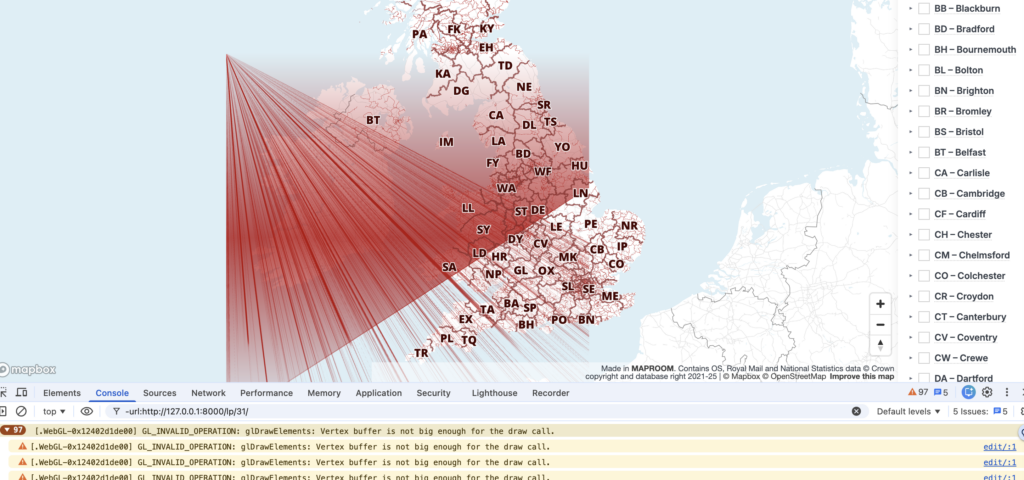
A month ago, the Maproom directors spotted that one of our demo maps was inexplicably showing hundreds of rays emanating from a point in the Atlantic Ocean off the northwest coast of Ireland.

We found odd bugs on several other maps – maps that had worked perfectly for years in all major browsers were displaying peculiar artefacts at different zoom levels. The artefacts were observed only in Chrome, not Safari, Edge or Firefox.

The Chrome browser console was logging the error: “GL_INVALID_OPERATION: glDrawElements: Vertex buffer is not big enough for the draw call.” This was not an issue we had encountered before.

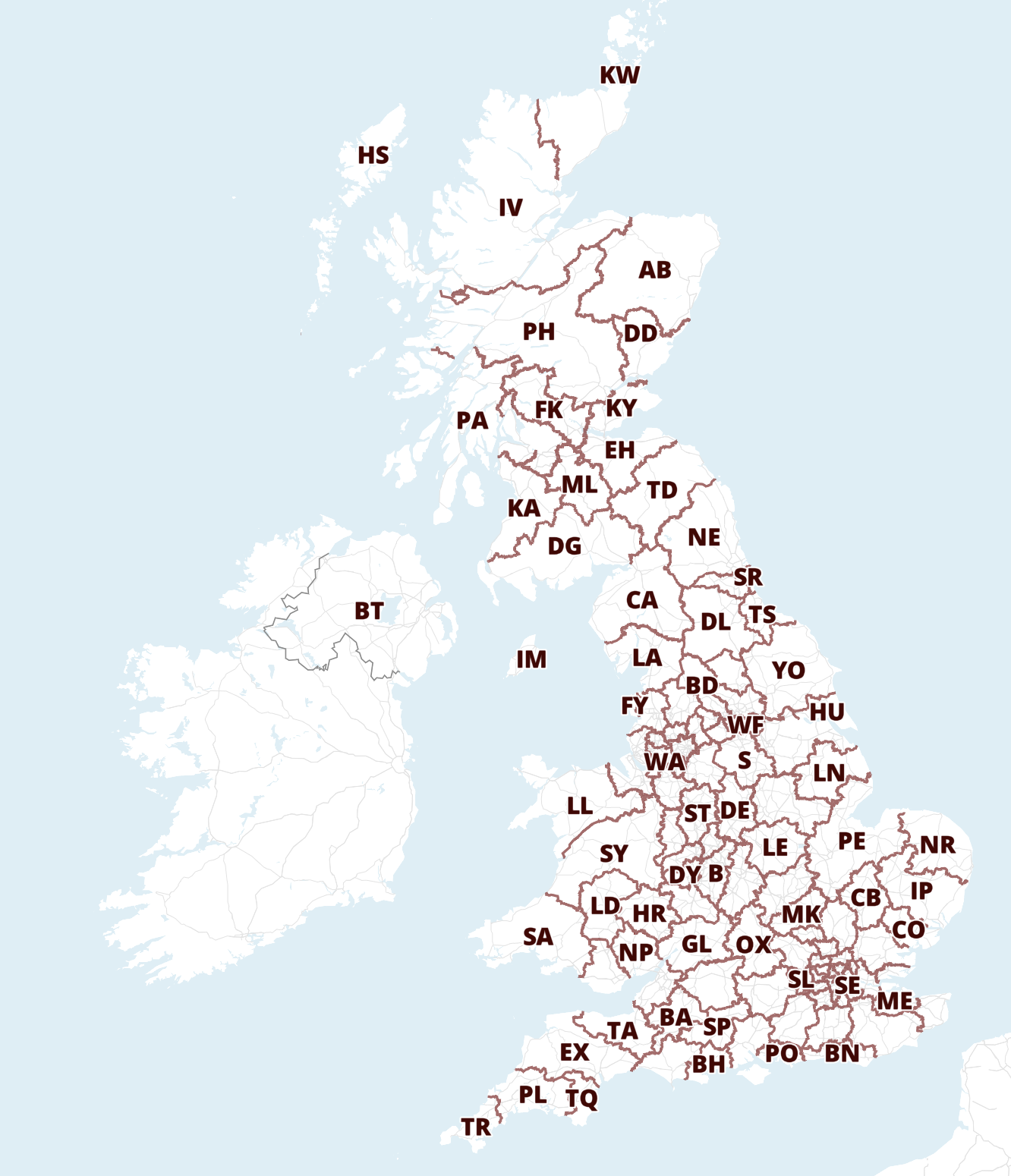
Clean map
The same map with mad artefacts after Chrome update

The first instinct of most developers is to assume that we had broken something ourselves. However, after checking recent deployments, testing different datasets, reviewing JavaScript changes and trying to reproduce the issue across multiple environments, nothing pointed to a fault in our Dynamic Mapping Suite. We could see the artefacts occurring in the Mapbox bases too, but it wasn’t Mapbox at fault either. The culprit for the messed-up maps was much further down the stack: to be precise, the most recent update of Chrome: version 148.0.7778.168 and its handling of Apple’s Metal API for ANGLE.

In simpler words, Chrome’s update in early May messed up the way in which an Apple Mac reads and renders complex web graphics!

Not just our maps

The problem wasn’t limited to Maproom.

Developers across the geospatial sector reported similar issues on Apple Macs, especially Macs running Intel chips. Esri, for example, documented a Chromium defect that caused rendering failures and WebGL errors in applications built with the ArcGIS Maps SDK, affecting map display and performance.

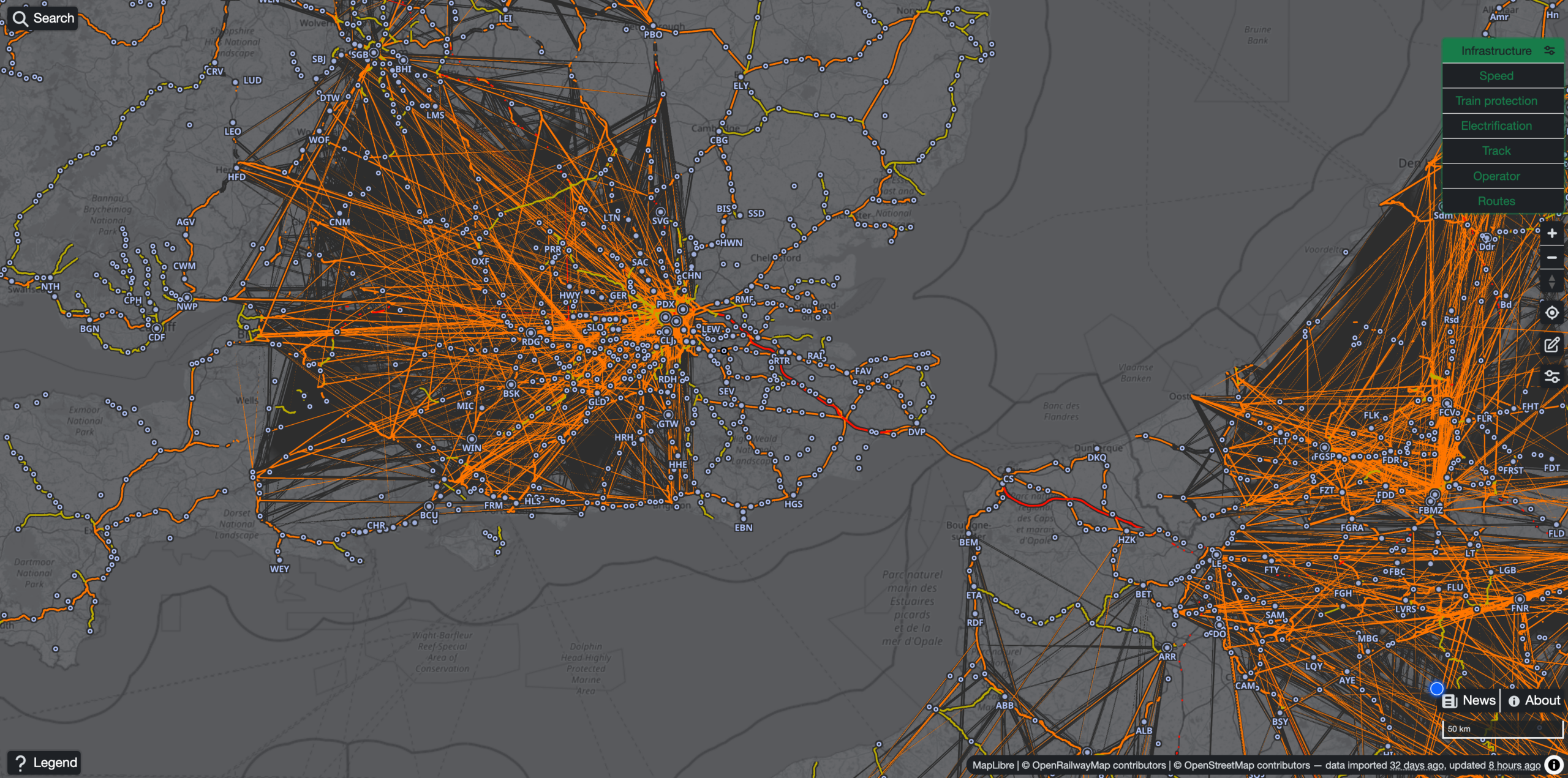
Similar multi-line artefacts on another GIS developer’s normally beautiful train map

We spotted a bewildering range of major rendering problems on everything from UK government boundary maps to interactive train routes and multi-layered history maps made by other geospatial cartographers. Even some interactive maps built on Google’s own Google Maps were broken on Apple Macs by Google’s Chrome update.

Mapping applications push browser rendering systems far harder than typical websites, thus advanced interactive maps were the first casualties of Chrome’s bug in May 2026.

The complex technical issue including our own report is logged by Google’s Chromium team here: https://issues.chromium.org/issues/513487198.

The good news

Google’s Chromium team investigated the issue on the day that we and other GIS developers reported it and admitted culpability with a solution promised to be in the offing.

Whilst waiting for several weeks for the solution to be applied, we found a temporary workaround during the period of disruption, which was to reduce the number of map layers from loading at low zoom levels. This was not a perfect fix, as there were still faint, almost ghostly line artefacts showing, but the sheer visual disruption was minimised.

We are relieved to report that he bug has now been fixed by the Chrome developers wtih Chrome version 149 released in the first week of June 2026.

For anyone who experienced broken Maproom maps on their Mac computers during the affected period (about a month), we hope this did not disrupt your workflow too much, or put you off interactive mapping.

If you are still experiencing peculiar interactive map rendering using Chrome on an Apple Mac, the solution is to update to Chrome’s latest version.

9 June 2026
Filed Under: Interactive Mapping, Maproom News

Maproom bases used in The Capture

iPlayer screenshot

Maproom’s base maps make a subtle appearance as set dressing in The Capture, the BBC drama that lives and breathes surveillance, AI, and the manipulation of reality. Set against a world where images can be fabricated and truth is constantly in question, the inclusion of maps in scenes with banks of surveillance screens adds an essential layer of authenticity – ironically grounding a story built on deception. It’s a quiet reminder that even the most reliable-looking data, whether maps or footage, can play a role in narratives that blur the line between what’s real and what’s constructed.

13 April 2026
Filed Under: Maproom News

Spinning globe with animated UK & Ireland flight routes

View full size map

See our showcase of dynamic, interactive online maps for more about this type of route map that we can build for you.


The flights map above is similar to a private map we built for the venture capital company Seraphim Space, investing in space startups. We cannot display the private Seraphim map here, but glimpses of our map are included in the marketing video below.

11 March 2026
Filed Under: Animated Maps, Bespoke Mapping Samples, Interactive Mapping, Maproom News, Travel Maps

Next Page »
  • Standard royalty free terms for downloadable maps
  • How to edit the downloadable maps
  • Licensing terms for dynamic online maps
  • Refund, tax and pricing policies
  • How to cancel or change a subscription
  • Privacy & cookies

All content © Maproom at Blue Island Media · Award winning media projects